Entity types and property sets
Description: Define fields for characters, items, objectives, and custom graph data.
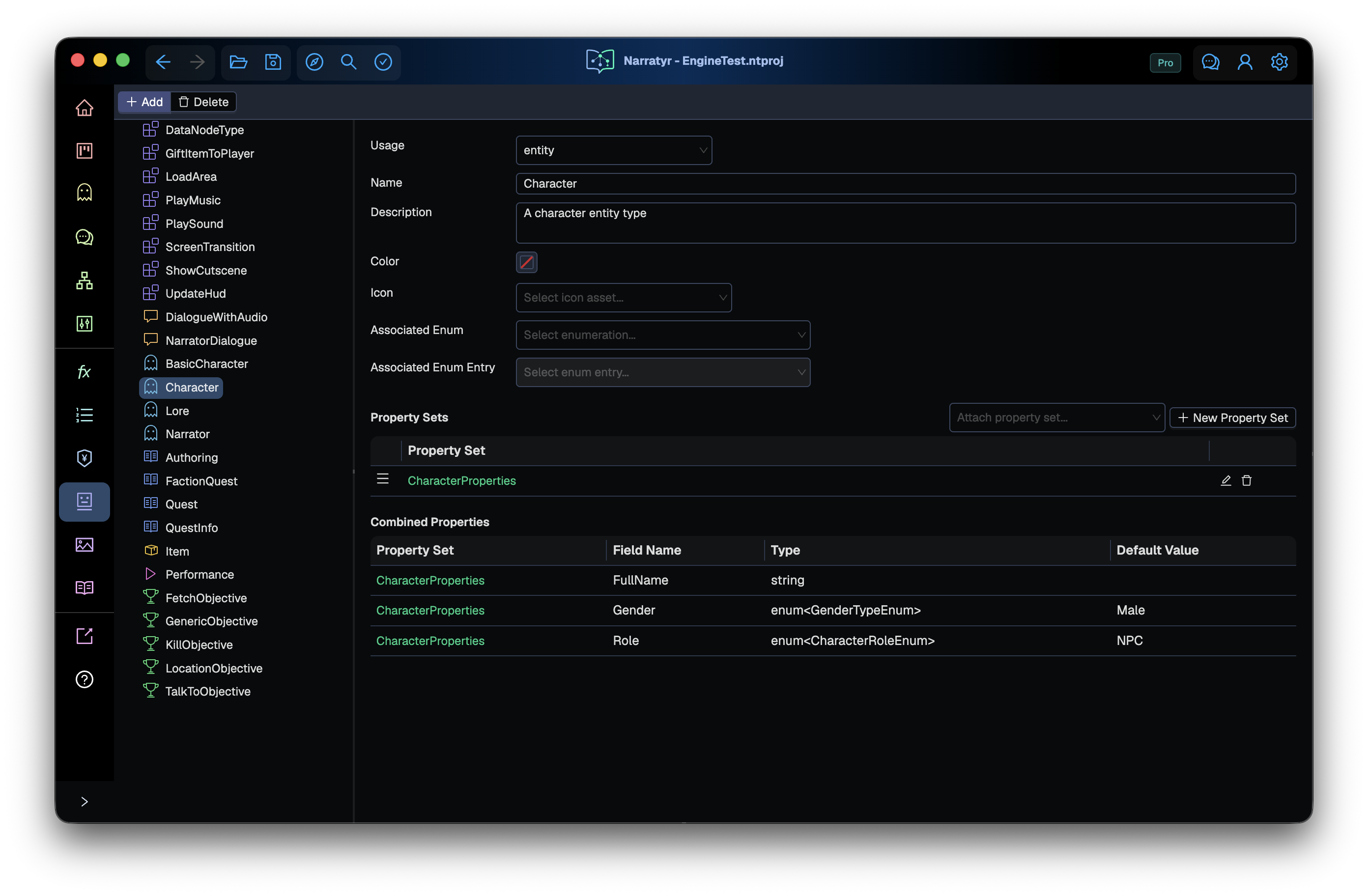
Characters, items, and objectives need different data. A character might have a name and portrait, while an item needs a stack size. Narratyr defines these fields through property sets and entity types.
- A Property set defines a reusable group of fields.
- An Entity type is a template built from property sets.
- An Entity contains values for one instance of an entity type.
| Layer | Purpose | Example |
|---|---|---|
| Property set | Reusable group of fields | CharacterProperties with FullName, Gender, Role, and Bio |
| Entity type | Template that includes property sets | Character with CharacterProperties and RelatedEntities |
| Entity | One instance with field values | Mira Thorne with FullName Mira Thorne and a character role |
Use the Property Sets, Types, and Characters & Items views to edit these layers.
Reuse fields with property sets
A property set lets several types share one field definition. Player, NPC, and Merchant
types can all include CharacterProperties. Adding a field to that property set adds it to each
of those types.
When you edit a shared property set from a type, Narratyr lists the other affected types. Select Make unique to create and attach a copy for the current type. Narratyr then removes the shared set from that type.
A property set can also belong to one type. A KillObjective type might use a TargetId field
that no other type needs.
Property sets
A property set has a name, optional description, folder path, and list of fields. The Property Sets view displays folder paths as a tree.
The name must use letters, numbers, or underscore characters without spaces. Exporters use the name for a generated class or structure.
Fields
Each field has a name, type, and default value. Unlike a variable, it stores a separate value for each entity.
Fields support text, numbers, true or false values, option sets, entity references, lists, and sets. Fields can also store an asset reference for an image, sound, or another project file.
Field settings control editing and export behavior:
- Required: project checks report an empty value as an error.
Multiline: the editor provides a larger input for a text field.- Rich Text: the text editor supports rich-text content.
- Translatable: export includes the text in player-facing localization data.
An entity reference field can limit choices to one entity type. A Merchant field that refers
to a shop can list only location entities. Lists and sets of entity references can store several
targets or related characters.
Fields and variables. Use a field for data about one entity, such as a character's role. Use a variable for world state, such as whether the player has met that character.
Entity types
An entity type contains an ordered list of property sets. Its fields combine the fields from those sets. Drag property sets to change their order in the entity editor.
| Setting | Purpose |
|---|---|
| Name | Identifier used in the editor and generated class name |
| Description | Editor guidance shown with the type |
| Usage | Category of data that the type describes |
| Color and Icon | Appearance of instances in the editor |
| Associated Option Set/Entry | Maps the type to an option set entry |
The Types view groups types by usage and sorts them by name. Types don't use folders.
Type usage
The Usage setting controls where Narratyr offers a type.
| Usage | Purpose |
|---|---|
entity |
Character, location, lore entry, or another entity created in Characters & Items |
item |
Entity that represents an inventory item |
dialogue_node |
Additional fields for a dialogue node variant |
quest_node |
Additional data on a quest graph's Quest Node |
quest_objective_data |
Fields for one kind of objective |
custom_node |
Data sent to the game with a custom node event |
graph_metadata |
Metadata selected for a quest or dialogue graph |
performance |
Delivery fields shown on dialogue nodes |
Only entity and item types appear in entity reference fields. Other types describe graph
data and don't identify objects in the game world. The Characters & Items Add menu shows
these supporting types as unavailable.
Narratyr creates the Performance type for new projects and prevents its deletion. You can edit its property sets, and dialogue nodes display the resulting performance fields.
Map types to option set entries
Types with quest_objective_data usage can map to an objective type entry. When you select an
Objective Type such as Kill, the editor finds the type mapped to that entry and displays its
fields. A KillObjective type might provide a target, while FetchObjective might provide an
item and count.
To add an objective kind, create an option set entry and an entity type that maps to it. Add the fields required for that objective.
Change a schema
- Rename fields, property sets, and types: values use stable internal IDs, so renaming a definition preserves existing data.
- Add a field: types that include the property set receive the field. New entities use its default value, while existing entities initially show an empty value.
- Remove a property set from a type: the fields stop appearing, but entities retain their values. Adding the property set again restores access to them.
- Delete a field or property set. Narratyr removes stored values from entities and graph nodes that used the definition. Undo can restore them before you save. After saving, use source control to recover them.
- Change an entity type: an existing entity keeps its original type and disk location. Create an entity of the new type and copy the required values.
Documents and the file format explains how stable IDs preserve data through renames.
Exported types
Exporters create a class or structure for each property set. An entity type becomes a class with one member for each attached set. This preserves the same grouping in game code.
A Unity Character type that uses CharacterProperties produces code like this:
[System.Serializable]
public class CharacterProperties
{
    public string FullName;
    public CharacterRoleEnum Role;
    public string Bio;
}

[System.Serializable]
public class CharacterEntity : Narratyr.NarratyrEntity
{
    public CharacterProperties CharacterProperties;
}
Choose type and property set names that work well in code. An individual entity uses a separate External ID, which game code uses to find that entity. See Exporting.
Next
Entities explains how characters, items, locations, lore, and other records use these definitions. Add a character creates an entity from an existing type. Variables explains global project state, and Documents and the file format describes storage for types and entities.